
When to Use Adobe Illustrator vs. Photoshop vs. InDesign
Would you choose a plumber that uses a saw, when what he really needs is a wrench?
One of the things that can be frustrating to creative professionals is receiving files that have been put together using the wrong piece of design software. It could be anything from using Adobe Illustrator instead of InDesign for layout or a logo that has been put together using Photoshop.
While it’s expected that pros should know this information, someone who’s cracking open the software for the first time might not even be aware that there are instances where you should be using one over the other. Just like a plumber would use the right wrench for the job, each program has a specific area that it excels at. So what I’ll be doing in this post is breaking down the three pieces of design software from Adobe – InDesign, Illustrator and Photoshop and explaining when to use them.
By examining them in this way, you can see what your specific needs are, this should help you to decide what program you’ll start learning. You’ll want to focus your attention on the piece of software that is most relevant to what your goals, and then apply that knowledge to the other two.
 When to use Adobe InDesign
There should be no confusion about when to use InDesign – its specific purpose is for laying out printed materials; that’s what it is designed to do. This could be brochures, newsletters, ads, business cards or books. Virtually anything that is made up of a combination of blocks of text, photos or other artwork. Its purpose is to take the elements that you create in Illustrator and Photoshop and put them together in one place.
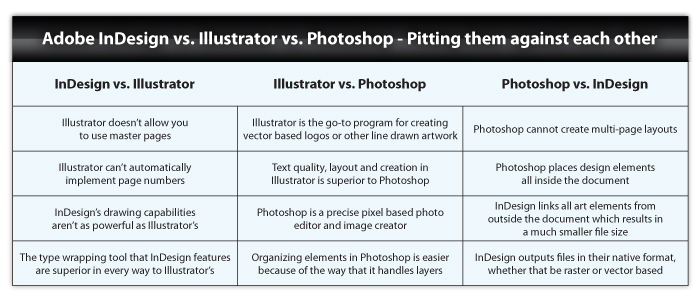
InDesign excels at projects that require multi-page layouts or master layouts where one theme reoccurs on multiple pages. Its text wrap functionality (where you can literally wrap text around images or objects) is much simpler and easier to use than it is in Illustrator.
People can, and do, put together layouts with Photoshop or Illustrator. However, in doing so, they often create files that are needlessly huge or put together in ways that are not optimal for commercial printers to use. InDesign, however, packages everything for you – all of your fonts and images. It does this so that you can hand off these materials to your printer and they can make your layout work in the exact manner that you intended.
While InDesign is a powerful tool, it does have its limitations. For one, it doesn’t have any photo editing capabilities. InDesign does give you the ability to draw vector graphics, like those you might find in a logo, but it doesn’t hold a candle to what you can do with Illustrator. Which brings us to…
 When to use Adobe Illustrator
Illustrator, as its name suggests, is for creating and editing vector based illustrations such as logos and brand marks or other design elements. Vector graphics are scalable images that can be sized as small or as large as you need them to be, and still maintain their resolution and clarity.
While it is possible to create multi-page documents with Illustrator for items like brochures or annual reports, there are a few drawbacks to using the program in this way:
- Illustrator doesn’t have a way to setup master pages the way that InDesign does. This is a necessary tool when you’re building documents that use templates.
- Illustrator doesn’t allow you to automate page numbers. This is another feature InDesign supports, which can be especially useful when dealing with larger documents.
 When to use Adobe Photoshop
Plain and simple, Photoshop is for creating and editing photos and raster (pixel) based art work. The program was originally developed as a tool to enhance photographs, but over time its functionality has developed to the point where it can be used to create:
- User interface designs
- Web pages
- Banner ads
- Video graphics
- Editing pictures for print
Because there is so much information about Photoshop out there in the form of tutorials and guides, some people feel that it’s all you need – a one stop shop. This couldn’t be further from the truth. The problem is that there are instances when you don’t need to use Photoshop, and should in fact be using Illustrator or InDesign.
- Do not create logos with Photoshop – It’s a bad idea that will do nothing but cost you time and money. Again, Photoshop is pixel, or raster based. If you create a logo with it, the files that it creates can not be enlarged or manipulated in the same manner that an Illustrator-based logo can.
- Do not set type in Photoshop for print projects – For type to print at its clearest, it needs to be vector based; Photoshop exports type as pixels. Now, you can save your Photoshop files in as an .EPS file which allows you to export type as vectors, but still this is not a best practice, so just don’t do it.
 Conclusion
Hopefully this article has helped to clear up some of the confusion that surrounds these pieces of software and when to use them. While I’ve only scratched the surface as far as the capabilities of Adobe InDesign, Illustrator and Photoshop, these are some of their most fundamental applications. Thinking about what you need to do with these programs will help you to organize your workflow better and ultimately create more professional looking documents.
Posted in Design Tutorials, Illustrator Tips & Tutorials, InDesign Tips & Tutorials, Photoshop Tips & Tutorials, Print Design
Don`t neglect your friends, share this right away.

Our marketing, design and printing experts are passionate about sharing their knowledge. We're eager to help make your vision a reality in print. Be sure to explore the rest of the Printwand blog for more reliable, easy-to-understand information.

Cheers for this, exactly the clarification i was looking for!
Glad to hear it!
that was very helpful! thanx a lot!
You’re very welcome!
I have searched many books, and I still have not found a book that covers Layout using InDesign. Rather, many new books cover layout and typography up to Tabloid size. Package, design, step and repeat, points verses. inches, container design, over size pages, etc seem to be left to old textbooks. If you can recommend any books that combine advanced layout (mock ups and templates) using Adobe CS5 or 6 I would really appreciate it.
Thank you,
Cathy
I don’t know of any books offhand, but you may want to try out the InDesign tutorials at Lynda.com. They’re pretty in-depth and they’ve been very useful to us in the past. Hope that helps!
Pricey. – But the free snippets look great.
Seriously?? It’s $25 a month and it would take far less than that to watch a course on indesign. If you can’t afford $25 to learn a piece of software that costs $1,000 then something is seriously wrong.
Can we please not bash others’ budgets? We never know what their circumstances are. Kudos to anyone for learning these tools however they can.
Actually, I think Mike is on the level this time. He is not “bashing,” rather he is responding to someone who is whining. This is the wrong time to be commenting on a forum about 25/mth if you cannot afford a 1000 piece of software, plain and simple, and so posting those kind of complaints are not helpful for anybody and are best reserved for the person’s private thoughts. Best to you.
Hear Hear to Amanda, I use my son’s adobe software because of cost and due to extenuating circumstances cannot at present afford any extras than adobe already offer. Not a crime, hopefully temporary, but let’s just say burials aren’t cheap, so am temporarily reliant on free help only.
This is very helpful thank you so much! 🙂
You’re welcome!
Awesome! I have the Master Collection and have only worked with illustrator, fireworks and photoshop, because I just didn’t know. Ignorance is not always bliss. Appreciate the clarification and for cracking the door open.
No problem, glad we could help!
Here it is:
I want a program that will allow me to take a picture of a home and change the windows or doors on it. the substitute windows or doors would be saved in different files. I need to place the new windows over the existing ones and scale them to the same size as well as possibly colour them. doors same as windows.
This is for a door and window company.
Which one should I be using??
Thanx
You’d definitely want to use Photoshop for this.
I’m interested in how Alex is going to scale raster graphics (i.e., Photoshop)? That’s not going to work well. Suggestion – Illustrator for this job.
Thanks so much I appriciate. Renna
Glad we could help!
This is exactly what I needed. There is so much overlap with these programs that I was unclear as to which one I needed to use for my current project. I took a ten week course that gave a basic intro to each of these programs, but it was so long ago that what I learned is now a blur in my mind. Thanks for the clarification.
Happy to help! Let us know if you run into any other snags with your project.
thanks a whole lot! this is a great article, that realy does clearify the differences between programs! lots of regards, all the way from Israel :)!
Thanks, glad you found it useful!
Great info…I’m familiar with photoshop and illustrator but have never worked in indesign and i’m getting ready to recreate my companies catalog.
Based on your definitions and inforamtion I know it is best to do the layout in indesign…
My question is…where do I start? Once I have a template that i want to use do I just bring my photoshop and illustrator elements in? I tried using indesign for a business card one other time and my images and everything looked terrible. Is that normal. I ended up asking for the template as an illustrator file. Thanks for any additional guidance you may be able to provide!
This tutorial might help you out:
http://www.graphic-design-employment.com/indesign-files.html
In particular, check out the “Import a Logo or Vector Graphic” section where it talks about changing your Display Performance settings.
Let us know if you’re still having issues!
Fabulous article. Please don’t ever take it down. While I have been interested in photography for years, I am new to digital photography. I am looking to choose my entry level software and this article made it very clear and easy to understand what to look for in these different packages. Thank You!
Thanks so much, that means a lot!
Thanks for writing this, am usually confused with things that straddle. I use photoshop and lightroom for editing images, and photoshop for composing multiple images. Always went to illustrator for logo design. But wanting to design my own holiday cards with images and type/shape elements and unsure where to go. I think photoshop for the masking and dropping in images but then I know I dont want to do my type in there. Would you suggest Illustrator or is this a time to check out InDesign (which I have no experience with)
Thanks!
InDesign is mostly useful for multipage layouts like books and brochures. I’d stick with a combination of Photoshop and Illustrator: use Photoshop to edit your images, save as a TIFF, import into Illustrator and continue to create all your vector stuff there.
Let us know if you have more questions!
Thank you for going to the trouble to explain this. Very helpful! 🙂
Happy we could help!
Previously I’d made Illustrator my one-stop-shop (I started my own personal photoshop rebellion and wanted to do things differently).
I’ve been reading up on and observing the new wave of user interface design and it made me reconsider using it.
I ended up creating all of the graphics for my latest web design project in Photoshop and I have to say, my eyes have been opened.
I have even been carrying out layout design work in Illustrator, since the core graphics I had been creating, were Illustrator based.
I think though, for my own personal development – dropping the elements into InDesign would not hurt and since the work is for print, it’s just logical.
Thanks for giving me a little nudge towards greater professionalism.
Glad we could help clarify!
Some excellent information in this post. Thank you. I am surprised though that Fireworks is not mentioned, with it’s strong ties and feature set for creating/editing screen-based graphics and application and web design.
Thanks for the suggestion, we might do a Fireworks-related article at some point in the future.
I’ve been using Photoshop for everything from web to print to logos for years. Thanks for the clarification!
Happy to help!
This is EXACTLY what I needed! Thanks so much for the clarification!!
Happy we could help! Let us know if you still have questions.
Thanks for the explanation it was really helpful.
I do have a question though, which program is the best for drawing?
The plan was to sketch something on paper, scan it in and edit it in illustrator, after that I would probably paint over/colour it in photoshop. The drawing involves characters but also detailed scenery. Also, the drawing will be high quality and cost a lot of time. Does the choice depends on the size or ratio too? So I would like to hear from you how you would edit a sketch. Thanks in advance.
It depends somewhat on the effect you’re going for. If you want a photorealistic effect, you can scan, sketch, and edit in Photoshop. For this you will need to know the size you plan to end up with; just make sure you create your image in the desired size and at 300 dpi resolution.
If you want a more simple image (like a comic-style illustration), you can create it in Illustrator and then set it to whatever size you want (since it’s vector based).
I’m not sure I understand why everyone says that Photoshop is purely raster-based image editing. I use the pen tool constantly.
Vector shapes/paths are perfectly doable in Photoshop and scale indefinitely.
Is the problem that it limits the software that your project can be edited with? Does Illustrator/InDesign simply do away with that “half pixel” that seems to show up in Photoshop if you aren’t careful? Otherwise, I don’t see why it can’t be a one-stop shop.
Photoshop can be used to create scalable vector art, but it does come with some technical limitations depending on what you plan to use the artwork for–especially if you plan to have it printed. Photoshop vector art can’t be used with certain printing methods or materials (such as custom drinkware), which means you might need to recreate the artwork in Illustrator later. It’s much less of an issue if your end result is purely digital, but it’s important to know the distinction when creating printed products.
Thanks jmaurer. The technical limitations make sense. I’ve been “keepin’ it digital”, as it were.
Sir thanks for your help.I need to ask one question that as you said that in illustrator we can easily increase the resolution. I have created a design and i want to export it as a high resolution. how to do that ?
The discussion over here might give you some more information: http://en.allexperts.com/q/Adobe-Illustrator-1027/image-resolution.htm
Let me know if you’re still having issues!
Superb, helped me get on track what I needed to do 🙂
Very very well explained..exactly the way I was looking for…..
thanks a lot …bravo.
For comics, would you say that Photoshop would be good to make the pages, and edit them; InDesign to format the comic; and Illustrator to come up with a logo for it?
Yes, though it might depend on how you’re actually drawing the comic. Photoshop would be good for editing hand-drawn images you’ve scanned, while you’d probably be better off with Illustrator if you’re creating the characters directly from the computer.
This is a nice summary of each program’s ideal role- thanks for sharing it! I am having trouble figuring out how to smoothly move materials between the three programs, especially between Photoshop and Illustrator. Does anyone have any suggested resources/online articles to help with learning how to go back and forth?
This article mainly concerns CS3, but much of it should apply to newer versions as well. http://layersmagazine.com/mixing-it-up-with-cs3.html
Thanks for replying so quickly! This link looks like it will answer some of my questions. A lot of tutorials gloss over the part of going back and forth, assuming that we all know how, but I know from experience that the devil is in the details….
I am torn between using Indesign or Illustrator for our church. We need to make a church bulletin which is typically a one page back and front tri-fold and possibly other printed materials such as a brochure. But we would also need it to change our logo around for different things such as making t-shirts or coffee cups. Which program would you recommend? Thank you.
In this case, you could actually use either, but I would suggest InDesign. It works better for multi-page mockups and also includes vector tools suitable for logo manipulation.
Thank you very much, I used to do printing design in Photoshop which has caused quite a lot of troubles… Now is really the time to finally learn Indesign. 🙂
This was super helpful!!!! ?
Glad we could help! Let us know if you have any questions.
Thanks for giving of your time and knowledge to help so many of us! I have all three programs in question (CS6) and want to train myself to create Blu Ray covers and DVD covers quickly, looking to future employment doing so. I can create the content of these items no problem, but I’m not sure where to assemble the finished image. For example, I could create from start to finish a Blu-ray cover in photoshop if need be, but I never know if it’s in photoshop where I need to set the precise measurements (canvas size) of the cover or if I can just keep the file editable and fit it to a template in InDesign (or other cover creation software, like AVS).If you were doing this, at what point and in which of the three programs would you set the BluRay/DVD cover measurements?
You could actually use any of the three programs to create BluRay/DVD mockups, depending on your personal preference. All three allow you to set the size of the artboard (or canvas, in the case of Photoshop).
Thank you a lot for your great help. I haven’t yet one of the programs but want to buy one, or, if it’s necessary, all of these three. I have a lot of paintings (with acryl) which would be great for textildesign or stationarydesign. Once, I did a painting for an advertising-poster (size A3, and small flyers), scanned the painting in a professional shop and gave it to a professional designer. He used InDesign and I was allowed to watch when he worked with this program. I loved it and the result was cool! So, when I’ve understood you right: photoshop is not using for printed stuff. Or is it possible as you wrote above: to edit in photoshop, save as a TIFF, import into Illustrator and continue there? Actually, first I wanted just to buy InDesign, but now I am a bit confused…;-) By the way: the paintings don’t have to be too much changed, because already finished.
Thanks a lot for your answer.
All three programs could be used to achieve what you’re describing, depending on your preference. If you prefer to use InDesign, go for it.
Great article, very informative. Wanted to ask, if I needed to create a single or double sided brochure, that could possibly be printed on a inkjet or laserjet printer or sent to a commercial printer for printing. Which would be the better way of doing it? 1) Create the brochure in Illustrator with all the vector graphics and text. Then drop in any photos to use from Photoshop into the Illustrator file. Or 2) Create a InDesign file, drop in any vector graphics, photos from Photoshop and type the text in InDesign. Which way would be more commercial printing freely, when you have to deal with CMYK, trim lines, bleeds and etc.?
Thank you
It mostly depends on your personal preference regarding which programs you’re most comfortable with. Either technique would work (as long as your commercial printer accepts the resulting file format).
I am trying to decide how to design my character for a storybook and be able to manipulate the character movements from page to page easily. I am writing a short story and am looking to self publish. Which programs would I need to purchase to achieve this professionally? Would you suggest getting a cartoon drawing program?
Thanks for the very clear, concise explanation!
Thanks so much. Have been using PSD for everything (digital) but new client requires a lot of print ready artwork and have been hitting road blocks with PSD. This article has really helped clarify and given me ideas for how to be more proficient moving forward.
I have used illustrator for images and newsletter – and have seen others use inDesign for catalogs (I provided text in Excel spreadsheets and Word docs) – Photoshop for just resizing images – I am told that inDesign is a nightmare for making global edits to font formats and other changes – so would it be best to use all three Illustrator for text, Photoshop for images, inDesign pull in from Illustrator and layout for printing (we will be printing in house – so if I can just print from Illustrator, that would prevent me needing to learn another program)
Thanks so much for all this great info!
Indesign is the easiest place to change fonts, make text boxes and revise text.
You just need to know how to do it. It is extremely easy. You can probably look it up on youtube.
I’m REALLY fond of simplicity and you delivered. Usually one has to wade though pages of non-essential information before getting the answer one needed. THANK YOU!!! I think you’re brilliant.
Nice article. But I found a trick where images can be edit in InDesign. So lovely trick..
Thanks! This information was very helpful. I was under the assumption that Photoshop was used for everything related to design. I’m so happy I ran across this post.
I need to purchase a program to create digital images for a website (emails and web-content) as well as occasional print productions (need vectors usually – for banners, signs etc.)… which program would be the best (most versatile) purchase?
Thanks!
If you’re usually working with vectors, Illustrator is your best bet.
Great! Thank you for the quick response!
My son wants to make t-shirt designs and we need to know what program would be best. He will create the design himself and needs to also add words with the pictures. Is illustrater the best for him?
If the designs he’s making are mostly composed of vector art (illustrations), Illustrator would be the best choice.
I was wondering if InDesign is the best option to use for creating CD album covers? I would like to create a CD album cover for a band for a school project, however I have no experience with InDesign. I would love to learn how to use it. I am very good with Photshop however – would it be useful to create all graphics/elements inside Photoshop and then compile them together in InDesign?
Thanks!
Photoshop would work fine if it’s just the cover. If you’re making a multi-page document (like liner notes), InDesign is preferable.
Yes, I am making the entire CD – back, front, side, etc. I am considering doing liner notes, but if not, should I use InDesign for the prior mentioned elements(but maybe not the liner notes) – especially if I want to learn how to use it?
Thank you very much.
You could use either Photoshop or InDesign. Could be a good opportunity to try InDesign if you want to become more familiar with it.
this was helpful. thanks
soooooooooo, where does LiveCycle fit into this ?
appreciate it, thanks
Thanks for the info! This is every helpful and concise!
I have a question for you: For simple photos or graphics of words, or maybe words and or logos written/imbedded in photos for INSTAGRAM, is Photoshop good enough for these social media posts?
Or, do you have a better recommendation and why?
Thanks!
Photoshop can definitely work. If you’re working with pure vector graphics, you may want to consider using Illustrator so that you can make them scalable.
what is your opinion about constructing web ads. i like to use indesign, then highrez pdf, then open in photoshop and edit the size. my coworker constructs in photoshop then outputs a jpeg. does working in indesign or photoshop effect the clarity in the end result. hope i made this clear.
thanks, in advance, for your expertise.
Neither workflow would affect the quality significantly, though if you’re working in InDesign, you could always just export as a JPEG at your desired size.
Excellent article!
Very helpful, exactly what I needed. Kudos.
For creating graphics and or putting copy on photos for Instagram, what program will handle that best?
Stick with Photoshop for any type of photo-related editing.
Thank you for the clarity! One question though, my mother asked me to design a book cover, so would the best practice be to create my initial artwork in PS and then export to Indesign and do the layout? All of my decorative brushes are in PS 6 and CC where I do most of my work.
If you’re more comfortable in Photoshop, that would work fine. Alternatively, you could create the design directly in InDesign.
Many thanks for this much needed info.
I want a program that will allow me to take a picture of a home and change the windows or doors on it. the substitute windows or doors would be saved in different files. I need to place the new windows over the existing ones and scale them to the same size as well as possibly colour them. doors same as windows.
This is for a door and window company.
Which one should I be using??
– your answer was to use photoshop which photoshop program specifically or am i confused?
Adobe Photoshop would allow you to achieve this effect.
I’m a freelance designer that only works with PS/ILL as the clients only want ai or tiff files. In PS we enhance photos (enlarge, change resolution, color mode, color corrections, cropping) and in ILL we use them linked. In ILL we make flyers, brochures, billboards, calendars, small booklets, book covers and shop rack cardboards. We usually save cmyk in ai, ai outlined text and/or tiff. And previews in lowere resolution rgb. The only thing missing is a proper 3d tool for packaging. Hence I’m studying Maya as well. Adobe was not made for former Cad engineers. I would welcome linked perspective images.
Great Job thank you !
Very useful and succinct – just what i was looking for (and couldn’t find on the Adobe site!)
thanks
I am working on a book project. The book will be 8.5 X 11 inches in size and will be mostly photographs. My question is can I design each page (8.5 X 11″) in Photoshop and then import that finished page into Indesign for book layout? Can I create a page in PS with lots of layers (including text) then flatten the image before saving and importing into Indesign?
Thanks for any help!
Yes, that should definitely work.
Excellent Article! Wow, really, really exemplifies what “content” should be; easy to read and understand while offering clear understanding. Amazing!!
Highly recommended! You made my day!
Thank you once again!
Thank you for this. It’s still very useful.
Thank you! This is just what I needed to get started!
Thank you! This information was precise and to the point, I found it very helpful.
I’d say the more frustrating thing is these “creative professionals” who you pay an arm and a leg too, expect you to own three different types of expensive software just to run your business. If I give him a goddamn photoshop file he’s a professional, tell him how to get his stupid machine working with it. That’s the real frustration!!!!
Can you lock text layers in InDesign? That was the annoying thing about Quark Express when I used it many years back the text boxes got in the way and couldn’t be locked.
Yes, that can indeed be done in InDesign.
This was a great article thank you!! I tried to find something like this from adobe, but did not. I was just curious your opinion on blueprints/floor-plans. I need to design multiple floor plans for my job. Many of the elements will repeat often, so I am thinking illustrator is probably going to be my best bet. Scaling to different sizes and converting to PDF will also be need. Do you agree illustrator will be the best program for me? Or do you know of another adobe program that might be better?
Illustrator sounds like a good choice to me.
Thank you again!
I use all the 3, i agree with your arguments. they are all good and simple programs, for every task there is a good powerful program.
Quite helpful. Thanks for sharing.
Hi I need to make ads which will be printed in papers, glossy magazines and gloss brochures. They need them to be 300dpi and saved as a pdf. To make the ads I use photos of products and layer with text and our logo. Which program would you suggest I use to make the ads?
Thank you very much
If you’re working with photos, I would suggest Photoshop, but either Photoshop or Illustrator would allow you to do what you need.
Thank you for the post and clarifying what each software is best used for.
Thank you sharing this information! Very helpful! I have a basic question – I would like to create professional looking flyers for my business. What is the best software to use? Keep in mind, my experience with all three software applications is limited. (Photoshop, illustrator and indesign)
Also. – Are any of the software “user friendly” to non graphic designers?
Many thanks,
Regina
If the flyer contain photographic elements, go with Photoshop. Otherwise, Illustrator would be a good choice. All three are relatively straightforward if you’re not planning to do anything very complicated, but if you run into trouble, there are plenty of tutorials available online.
Planning a project that will result in 8 display panel printed on vinyl 3 ft by 7 ft each, containing text, maps, and photos. which would be the best place to start AI, InD, Ps.?
In the New Document set-up box after print, what size, width and height would be set?
Photoshop would probably be a good choice. As for dimensions, your printer would be the best one to ask.
Thank you for the great article! I’m a writer for non-profits and have been asked to update brochures and create infograms. What program would you suggest? I currently don’t use any of the programs you reviewed but am open to buying and learning one.
Generally, Illustrator for illustrations and Photoshop for photo-based designs is a good rule of thumb. If you want to start out with something free, this post might be useful: https://www.companyfolders.com/blog/the-16-best-free-adobe-photoshop-alternatives-for-mac-windows
Planning to make brochures which would be the best to start illustrator, In Design or Photoshop? of course i had never work with illustrator and in Design but like to learn i had work only with Photoshop…
Photoshop should work fine, though you may want to switch to Illustrator if the brochures will be based mostly around vector illustrations.
I plan to design party designs to be emailed to client for printing – printable invitations (5×7), printable party decorations (designs, many on an 8.5 x 11 page to be cut out). Would you recommend InDesign for this?
If the invitations are just a single page, I would recommend Illustrator or Photoshop, but InDesign could be used as well.
Thanks for the information. I’m self-publishing 6-8 picture books. I’ve been working in word, using Photoshop to edit, size illustrations, etc., but have problems with sizing when importing into Word. Sounds like InDesign would be a better choice.
Thank you, this helps clear the air that I’m not crazy and that I need to possibly bring the rest of my team up to speed. I work with people that only rely on Photoshop for everything and use it to create booklets and large scale prints that have combo text and images. I get chastised for making master files in InDesign, and get the run around its too hard. Yet I see them make more work for themselves by setting type in Photoshop, taking that image and then placing it in Quark… to then make it into a PDF. As for the booklet I see them number & save all of the individual pages, then compile those jpegs into a PDF booklet. But I’m the crazy one for wanted to do things in InDesign and Illustrator… sorry for venting
Thank you for a wonderful article…so clear and easy to understand 🙂 What is your professional opinion for my particular needs. I want to place my own scanned calligraphed names into a 5″x7″ wedding invitation. Do I scan and edit in PS, bring it into Illustrator to convert to vector, then place into InDesign to add text (sans serif, wedding date, location, etc.)? I’m hoping to simplify this process and not have to use 3 different program. I appreciate your thoughts 🙂
I want to do simple projects and do not have any software as of yet. What would you recommend for birthday invitations, thank you’s, wedding invites?
Hi there. I’m hoping that you’ll still be replying to comments this far down the road…
I want to design A4 and A3 printables (which I’ll sell as digital downloads for people to print on their home printers), mostly text based with some basic vectors which I’m buying. I’m completely inexperienced with Adobe and graphic design in general. I just want to be able to have my chosen A4 or A3 canvas and then type on it, with the ability to resize the fonts, but also do things like type in a curve, or in a circle, or make it look big to small (if you get me, like its getting smaller into the distance type thing) so text effects in general, and I also want to be able to resize vectors within the A4 or A3 canvas without losing quality when printing.
So what’s best, illustrator or inDesign? I don’t want people to print at home and it be all pixelated. I’m so confused, and on a very tight budget, so i don’t want to buy one and then realise I should have had the other.
Appreciate any guidance you can give. Thank you!
It seems to me that Adobe could have combined all three pieces of software into one or at least Illustrator and InDesign. Just a money grab I suppose.
Thanks , for this information but i want to know that if i want to print a add or a packaging layout. Some edited images are in photoshop , and graphics are in illustrator . So what will be the proper method to import images from PS to AI for a good quality print.
Thank you very much! I was really getting confused with these three offering seemingly similar functionality and when to use which one of these!
Hi i want to design my own cards – I have no experience in any of these programmes but want to do a course so I can do this
which is the right application to use. And, go and do a course for –
your help will be appreciated
Faye
I usually just get exposed a lot of these ‘Photoshop vs Illustrator’ discussions based on my designing experience but never got heard the necessities for InDesign to me yet. Still, this is a good article providing insights to me about the usefulness of InDesign and I’ll be looking forward to try it in the future. Thanks again for these clarifications!
For multiple page documents, Indesign hands down. You can resize vector images and raster images (as long as the source file is large enough). change text, link text boxes etc. It would be like reading a book bound together, vs reading a book with loose pages. InDesign binds the pages together, you can change master pages and the whole book changes, or change page numbers and the whole book’s pages are renumbered, you can use continued on page XX and InDesign automatically will change the reference for you if you move the linked text to another page, the other programs are loose pages. If that makes better sense?
Photoshop can totally be used to create logos. It has vector functionality that works just fine. I’ve used it for years for this purpose and never have had an issue.
In many cases it works very well because I can draw my design out by hand and simply convert to paths in a very efficient manner with total control and minimal cleanup.
Just another approach, but I thought it worth mentioning that there really shouldn’t be a hard and fast rule against photoshop and vector based creation.
From my so far experience I can tell: – Anything print related, go with InDesign – Anything vector, go with Illustrator and – Everything else, go with Photoshop.
An outstanding review and comparison of these products; clearly presenting exactly what users need to know about the different purposes of each product, and when to use one versus another. Very well-written, concise, and easy to understand, after reading this review, the reader will have a clear understanding of which product is best for his or her purposes, and which are perhaps capable but not optimal for performing each type of image processing. Includes just the right amount of relevant technical information, but not so much as to distract from the purpose of the review, which is to enable the reader to understand which product to use for the different types of image editing, and why.